顯示具有 EDKII 標籤的文章。 顯示所有文章

2024年6月27日 星期四

File checksum and hash calculator for UEFI shell (support Checksum32, CRC32, MD5, SHA1, SHA256, SHA384 and SHA512 algorithm)


FS0:\> chchecksum.efi
Usage:                        
FS0:\> Checksum.efi filename 
                              
        2024.06 By Bohan Huang

FS0:\> chchecksum.efi 1
FileName = 1
FullPath = 1
Error Open NULL

FS0:\> chchecksum.efi 1 2
Check the command of size !

FS0:\> checksum.efi Loader.bin
FileName = Loader.bin
FullPath = Loader.bin
File size [0x001F0548] bytes
Read file [0x001F0548] bytes
Sum32  => [0x0F6F5AD0]
Crc32  => [0x6B1829AD]
MD5    => D79DDA333FCB935769F877EA9B9B19AE
SHA1   => 62BBE5E125E195D7FB5E95ECC8B4F6C64B9EBFE8
SHA256 => 8674A606946578D09D86963B03CA1E438A9B7212B57D852411AE16E8012B6EBE
SHA384 => 2D2A12B375DB00C0925D1B4045F2D3B3719C7ED2867B7ADA3C55ED6382206F611331A6BA056E18144DFAE2C84E854DF9
SHA512 => 2153D4308FD84E43B155BEE0565A112C1E84907D7D7E8BC400AC05A8002A4EB5CB8720376E5C47A430EC57A9E44E821A1EF7CD9F9236AE750A4DCD6204B350FA
FS0:\> 

Support: Checksum32 (byte sum), CRC32 (Cyclic redundancy check), MD5 (MD5 Message-Digest Algorithm), SHA1, SHA256, SHA384 and SHA512(Secure Hash Algorithm).

Downlad => checksum.zip

2023年2月23日 星期四

BDU v1.2.0 BIOS Debug Utility for UEFI Shell

BDU v1.2.0 supports the following new BIOS debug features :

1. Support Aspeed Super I/O
2. Support NcT5577D Super I/O
3. Dump full PCI scan registers including (similar to linux command lspci -vvv)
        a) PCI list
        b) PCI Express Capabilities (DevCap, DevCtl, LnkCap, and LnkSta)
        c) PCI Express Extended Capabilities
        d) PCI Configuration Space registers (256 or 4096 bytes)
        e) Byte Word DWord format
    and will auto generate REG_LIST.txt file
4. Fix exception for Intel Denverton chipset
5. Add Intel Purley chipset support
6. Add Intel Whitely chipset support
7. Add Intel Eagle Stream chipset support
8. Add progress bar when generating REG_LIST.txt


REG_LIST.txt include PCI List, each PCI/PCIE device register, specified memory, I/O space and ISA space.


Download bdux64.efi =>  BDUEFI_V_1_2_0.zip

BDU

Dump BootOrder

Dump SMBIOS

2018年5月11日 星期五

Dump BIOS Boot Order Tool in UEFI Shell

1. Download BOPx64.zip and extract zip file into your UEFI flash drive.

2. Execute the following command.

FS0:\> BOPx64.efi

Boot Order

2017年12月21日 星期四

USB Devices Scanner

1. Download USB.zip file.

https://github.com/spyker729/bohan-debug-utility/raw/master/USB.zip

2. Excute USB.efi or forward to text file.

fs0:\> USB.efi
or
fs0:\> USB.efi > usb.txt
image

~ Thanks ~


2017年12月20日 星期三

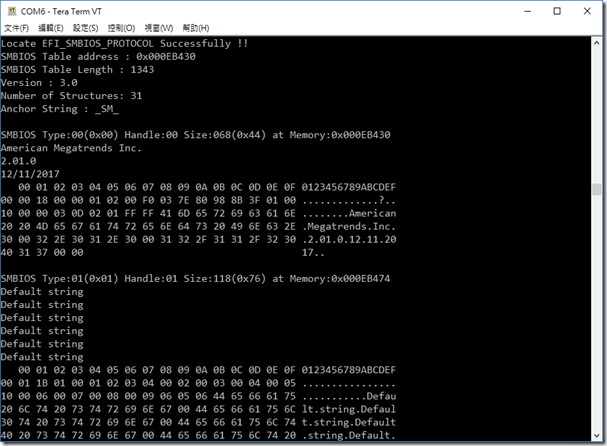
Dump SMBIOS Tools for UEFI Shell

1. Download and Extract zip file.

 https://github.com/spyker729/bohan-debug-utility/raw/master/smbios.zip

2. Excute smbios.efi

image

3. Dump and forward to text file.

fs0:\> smbios.efi > smbios.txt

smbios

How to read SMBIOS


~ Thanks ~

2015年12月24日 星期四

How to compile UDK2015 (UEFI Development Kit 2015)

If you want to complie EDK or EDK II

=> How To Build EDK & EDK II Environment In Easy Way

If you want to complie UDK2014

=> How to compile UDK2014 (UEFI Development Kit 2014) 

Download the following files :

1. Copy SVN Address for UDK2015.

http://www.tianocore.org/udk/udk2015/

image

2. Download source code using TortoiseSVN.

image

3. Follow the next steps for further compiling.

image
image
image
image
image
image
~ Thank you ~

2015年2月13日 星期五

BDU v1.1.5 BIOS Utility for UEFI Shell

BDU v1.1.5 Supports the Following New Features :

1. Support Perpetual Calendar (萬年曆).

CMOS_0x0070_0x0071_000229_113725

CMOS_0x0070_0x0071_870729_000729

CMOS_0x0070_0x0071_141230_113320

2. Adjust the PCI Input Formats.

Bus: XXX (0-255) Dev: XX (0-31) Fun: X (0-7)

PCI Format

3. Fix Bus Section can't Enter 3 Digits.

4. Fix the Scan Algorithm For PCI List Function.

5. Add Century Prompt at CMOS (0x70/0x71).

Century

6. Fix the mmcfg_base Fetching Algorithm for Haswell and Broadwell Platform.

7. Add Qlogic, ASPEED and Broadwell PCI device name supports.

8. Remove the Auto-Refresh in PCI List, Menu, Help, SMBIOS, PCH Strap, and SYS Info to reduce the stress on Serial Port.

Download @ BDUEFI_V_1_1_5.zip
~ Thank you ~

2014年12月23日 星期二

BDU v1.1.4 BIOS Utility for UEFI Shell

BDU v1.1.4 supports the following features :


1. Support automatically generate a unique file name for every time of pressing F12 key to do screenshot capturing.


Format : FunctionName_YYMMDD_HHMMSS.bmp

iScreenshot_141223_101359


2. Support pop-up messages before BDU starts to capture a

screenshot.

PCI_B000_D031_F000_141223_101229Memory_0x000EDB70_141223_101240

IO_0x0000_141223_101247

CMOS_0x0070_0x0071_141223_101309ISA_0x0295_0x0296_141223_101313

Menu_141223_101318

Menu_141223_101320

Help_141223_101322

PCH_Straps_141223_101333

SIO_0x002E_0x002F_141223_101255

SIO_0x004E_0x004F_141223_101300

SIO_0x006E_0x006F_141223_101305

SystemInfo_141223_101336

PCI_LIST_141223_094720

PCI_LIST_141223_094725

PCI_LIST_141223_094727

3. File will be generated at your current folder, not root folder.

Ex : Current Folder : fs0:\BMP

=> File Place : fs0:\BMP\FunctionName_YYMMDD_HHMMSS.bmp


4. The default image size has changed from 800x600 to capture image depend on your current resolution.


Download @ BDUEFI_V_1_1_4.zip
~ Thank you ~

2014年12月19日 星期五

iScreenshot v0.0.3 for UEFI Shell

iScreenshoot v0.0.3 has the following changes :


1. Support automatically generate a unique file name for every time of pressing F12 key to do screenshot capturing.


Format : iScreenshot_YYMMDD_HHMMSS.bmp


2. Support pop-up messages before iScreenshot starts to capture a

screenshot.


3. File will be generated at your current folder, not root folder.


Ex : Current Folder : fs0:\BMP

=> File Place : fs0:\BMP\iScreenshot_YYMMDD_HHMMSS.bmp

iScreenshot_141219_162058

iScreenshot_141219_162107

iScreenshot_141219_163011

iScreenshot_141219_163016

Download @ iScreenshot_V_0_0_3.zip

~ Thank you ~

2014年12月17日 星期三

BDU v1.1.3 BIOS Utility for UEFI Shell

1. BDU v1.1.3 supports capturing a screenshot by pressing F12 key.

2. Fix input bug when pressing P key to configure address.


P.S. if you want to capture screen under UEFI shell. Please refer to here.


The following are the default file format :

iScreenshot (3)

Memory

PCI

IO

ISA

Help

Menu1

Menu

PCH_Straps

PCI_LIST

Download @ BDUEFI_V_1_1_3.zip
~ Thank you ~