
BDU v1.2.0 supports the following new BIOS debug features :
1. Support Aspeed Super I/O2. Support NcT5577D Super I/O
3. Dump full PCI scan registers including (similar to linux command lspci -vvv)
a) PCI list
b) PCI Express Capabilities (DevCap, DevCtl, LnkCap, and LnkSta)
c) PCI Express Extended Capabilities
d) PCI Configuration Space registers (256 or 4096 bytes)
e) Byte Word DWord format
and will auto generate REG_LIST.txt file
4. Fix exception for Intel Denverton chipset
5. Add Intel Purley chipset support
6. Add Intel Whitely chipset support
7. Add Intel Eagle Stream chipset support
8. Add progress bar when generating REG_LIST.txt

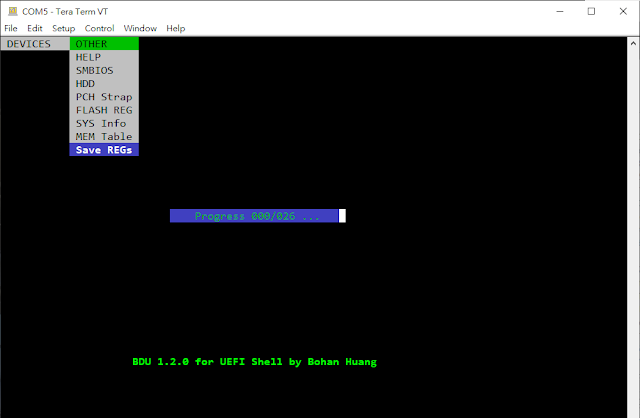


and will auto generate REG_LIST.txt file
4. Fix exception for Intel Denverton chipset
5. Add Intel Purley chipset support
6. Add Intel Whitely chipset support
7. Add Intel Eagle Stream chipset support
8. Add progress bar when generating REG_LIST.txt


REG_LIST.txt include PCI List, each PCI/PCIE device register, specified memory, I/O space and ISA space.


![clip_image002[4]](https://blogger.googleusercontent.com/img/b/R29vZ2xl/AVvXsEh09UzeOqTS7y6SAhrrA_0647j41a5tUryVmtze13B1b3NhoqP8MgUet6K9C3ud6dygqD-JMDkWw9QEpKHkCEfLfNnCdEMkSnZaVke7ch0TopHME-rVCOPlj_FmFLCP2lXRLiKu3Mp_590/s1600-h/clip_image002%25255B4%25255D%25255B2%25255D.jpg "clip_image002[4]")

![clip_image001[4]](https://blogger.googleusercontent.com/img/b/R29vZ2xl/AVvXsEjbbIrpqZQ_HZ-M-gvnmWlf5hSDDszc6b7OWvOTs-7dZaAcQer_ehqnfr9xycHmHHqVNs_VzGg0ibTVOx5KXFmu3cMNV1F-X_I3BruQba1Gcws1dpi7TKxtC8eCt2N6fL-18iwZIin54rg/s1600-h/clip_image001%25255B4%25255D%25255B2%25255D.jpg "clip_image001[4]")
![clip_image001[6]](https://blogger.googleusercontent.com/img/b/R29vZ2xl/AVvXsEhOyrgQjBAXOys1yKikvr9vFmHgnKn4eS55xlYffLenPmpa7AOTThCKAHIMwhrD0vifpqv9vmraDZWEPtX0TQBUXVvEQ7Ii9eqJ2Qs0PcJn3M7iylpCt4O_gu9rt_QbhrHMHExlb94c-FY/s1600-h/clip_image001%25255B6%25255D%25255B2%25255D.jpg "clip_image001[6]")
![clip_image001[8]](https://blogger.googleusercontent.com/img/b/R29vZ2xl/AVvXsEgamWSlMK5kZPHgnBRPE2Oha0GjaMGdQcinCI4KNzb2FSAxyCi0OkuGhP1Ysq2wWfi9daCsFoNeY-2zcS6Cb9kd-aEyrMwiB6WvoY8NrRZlqLEiErevaMvn3zsUl-wh6btsitUh3QYstaU/s1600-h/clip_image001%25255B8%25255D%25255B2%25255D.jpg "clip_image001[8]")
![clip_image001[10]](https://blogger.googleusercontent.com/img/b/R29vZ2xl/AVvXsEioe8Ey1GlJteNZ6xcNhBSMvWY1zETmwOiFlrCRsWQLXzodCisz_BgACbqcuyt1Oqt5ty1DrCr4nN5R9pEpeNlR97Z5FKqxwhh1PkEz___cfMJhFioSO20kxDbhWu8_d0lBSAs-MHieeIw/s1600-h/clip_image001%25255B10%25255D%25255B2%25255D.jpg "clip_image001[10]")
![clip_image001[12]](https://blogger.googleusercontent.com/img/b/R29vZ2xl/AVvXsEi-Es9BtYdomAvegP_lpsjykif8neW7T7dlqUJxRDLQO98xsPyL8cyZ6VlP64Fas_XZr6kWbR2EJAJ4Fo7AiieEdsHHGNiLCxaCOY4hCiarbNEGecs9X2Bz8k1p2RozDni5BkazkozTyOg/s1600-h/clip_image001%25255B12%25255D%25255B2%25255D.jpg "clip_image001[12]")
![clip_image001[14]](https://blogger.googleusercontent.com/img/b/R29vZ2xl/AVvXsEhwqYa62WhSWg3vSIiJLApGb18GtQf1hUi287rrkADoexNgdHXioTuoG6BgfRcj7ocQdWFiS_-41XWSlrDHg21055o5vBipv5dUKn4CEyJiGbVaYuupvDGt8ro1_NW04YLdQ_KVzQpDbcw/s1600-h/clip_image001%25255B14%25255D%25255B2%25255D.jpg "clip_image001[14]")