顯示具有 Windows 標籤的文章。 顯示所有文章

2023年2月23日 星期四

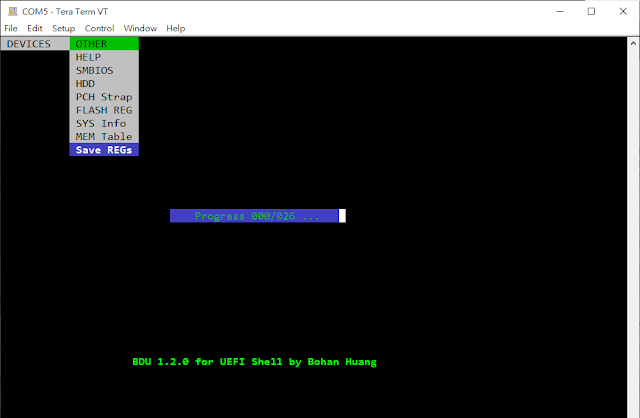
BDU v1.2.0 BIOS Debug Utility for UEFI Shell

BDU v1.2.0 supports the following new BIOS debug features :

1. Support Aspeed Super I/O
2. Support NcT5577D Super I/O
3. Dump full PCI scan registers including (similar to linux command lspci -vvv)
        a) PCI list
        b) PCI Express Capabilities (DevCap, DevCtl, LnkCap, and LnkSta)
        c) PCI Express Extended Capabilities
        d) PCI Configuration Space registers (256 or 4096 bytes)
        e) Byte Word DWord format
    and will auto generate REG_LIST.txt file
4. Fix exception for Intel Denverton chipset
5. Add Intel Purley chipset support
6. Add Intel Whitely chipset support
7. Add Intel Eagle Stream chipset support
8. Add progress bar when generating REG_LIST.txt


REG_LIST.txt include PCI List, each PCI/PCIE device register, specified memory, I/O space and ISA space.


Download bdux64.efi =>  BDUEFI_V_1_2_0.zip

BDU

Dump BootOrder

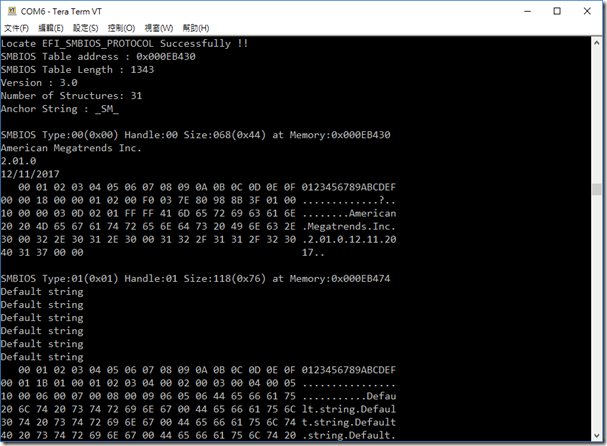
Dump SMBIOS

2017年12月20日 星期三

Dump SMBIOS Tools for UEFI Shell

1. Download and Extract zip file.

 https://github.com/spyker729/bohan-debug-utility/raw/master/smbios.zip

2. Excute smbios.efi

image

3. Dump and forward to text file.

fs0:\> smbios.efi > smbios.txt

smbios

How to read SMBIOS


~ Thanks ~

2014年12月11日 星期四

How to compile UDK2014 (UEFI Development Kit 2014)

Please make sure your computer has already installed Visual Studio 2008 or higher version 2010 and remember to install X64 compiler for generating X64 programs before compiling UDK2014.


If you want to complie EDK or EDK II

=> How To Build EDK & EDK II Environment In Easy Way


Download the following files :

1. Download UDK2014 source code from Sourceforge.

http://sourceforge.net/projects/edk2/files/UDK2014_Releases/

image

2. Download the GNU Patch.

http://gnuwin32.sourceforge.net/packages/patch.htm

image

3. Download http://www.openssl.org/source/openssl-0.9.8zb.tar.gz from http://www.openssl.org/source/


The following are the steps to compile UDK2014.

1. Unzip UDK2014.SP1.Complete.MyWorkSpace.zip to current folder.

image

image

2. Unzip UDK2014.SP1.MyWorkSpace.zip to current folder.

image

image

3. Unzip BaseTools(Windows).zip to MyWorkSpace folder.

image

image

4. Unzip openssl-0.9.8zb.tar.gz to MyWorkSpace\CryptoPkg\Library\OpensslLib folder using administrator privilege.

image

image

image

5. Copy the patch.exe in patch-2.5.9-7-bin.zip to MyWorkSpace\CryptoPkg\Library\OpensslLib\openssl-0.9.8zb folder.

image

image

image

6. Follow the instructions according to G:\UDK2014\MyWorkSpace\CryptoPkg\Library\OpensslLib\Patch-HOWTO.txt. (Remember to use the administrator privilege while executing commands)

image

image

image

image

image

7. The remaining steps.

image

image

image

image

~ Thank you ~